KozDbg
An anti-anti-debug plugin for x64dbg, built from my research into VMProtect's anti-debug checks. It supports the tested versions from 3.3.1 to 3.10.1, with a separate profile for each version.
No kernel driver required — including the VMProtect 3.10.1 profile.
KozDbg runs entirely in user mode inside x64dbg. It handles supported kernel-debugger detection queries from user mode too, without installing or loading a driver.
Native x64 · Editable INI profiles · MIT license
Download · Demo · Profile format · Report a bug
Getting started
-
Download the ZIP from Releases.
-
Close x64dbg and extract these three files into its plugins folder:
x64dbg.exe
plugins/
   KozDbg.dp64
   KozDbg.dp64.ini
   KozDbg.dp64.ini.profiles.ini
-
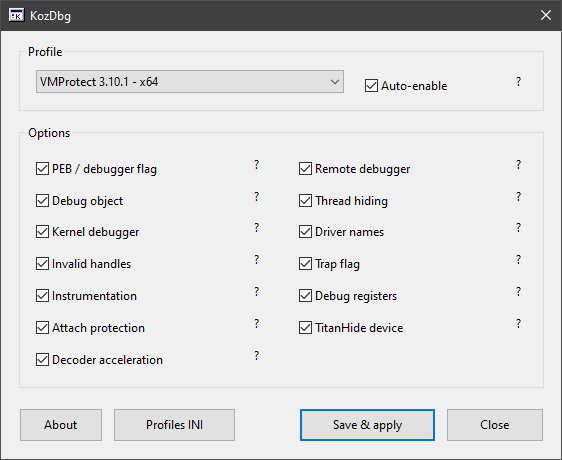
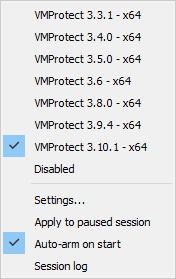
Open x64dbg. Under Plugins > KozDbg, select the profile matching your VMProtect version.
-
Leave Auto-enable checked and load the protected executable.
-
At the system breakpoint, check the log for profile armed, then press F9. If x64dbg stops at the entry breakpoint, press F9 again.
The default profile is 3.3.1. Select your profile before running the target; changing it after a detection has already happened will not undo that result. If setup fails, the log explains what failed.
Updating: replace only KozDbg.dp64 while x64dbg is closed. Keep both existing INI files to preserve your settings and custom profiles.
Supported versions
| VMProtect |
Profile |
Handling |
| 3.3.1 |
331 |
API interception |
| 3.4.0 |
340 |
API interception |
| 3.5.0 |
350 |
API interception |
| 3.6 |
360 |
Clustered direct syscalls |
| 3.8.0 |
380 |
Scattered direct syscalls |
| 3.9.4 |
394 |
Scattered direct syscalls and extended checks |
| 3.10.1 |
3101 |
Scattered direct syscalls and extended checks |
These are the versions I researched and tested. Version selection is manual; the range does not mean every intermediate build is supported.
What the plugin does
KozDbg handles the supported checks from user mode, including queries about kernel debugger state. It does not install a driver.
Depending on the selected profile, it covers:
- PEB debugger flags, remote debugger and debug object queries
- Thread hiding, kernel debugger queries and driver-name checks
- Invalid handles, trap-flag exceptions and saved debug registers
- Instrumentation callback clearing and remote-breakin protection
- TitanHide device checks in the later profiles
API addresses and syscall numbers are resolved in the target process. Profiles are not tied to the sample programs or fixed protected-code addresses.
Packed programs are supported where the layout is recognized. Decoder acceleration can reduce startup time, but needs an available hardware-breakpoint slot. Otherwise, the memory-guard path remains in use and startup can be slower. Protection settings and code layout still matter, so please report samples that behave differently.
KozDbg handles anti-debug checks. Unpacking, devirtualization, application key checks and anti-VM checks are outside its scope.
Profiles and controls
You can select a profile directly from the menu without opening Settings.
In Settings, hover over the ? beside an option to see what it does. Unsupported controls are greyed out for that profile. Save & apply saves the selected options and applies them; pause the target first if it is already running.
To create a preset, open Profiles INI, copy an existing section and give it a unique ID and name. Restart x64dbg to load it. See PROFILES.md for an example and the available engines.
INI profiles select options in the existing implementation. A new detection technique needs a C++ change, not just another profile name.
| Command |
Action |
kz_settings |
Open Settings |
kz_profile 331 |
Select VMProtect 3.3.1 |
kz_profile MyProfile |
Select your own preset |
kz_profile off |
Disable KozDbg |
kz_apply |
Apply the selected profile while paused |
kz_status |
Show the current state and counters |
Repeated plugin information messages are counted instead of flooding the log. Errors are still printed. x64dbg's own exception logging is separate.
Demo
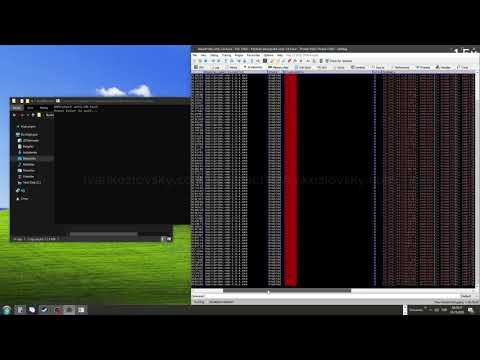
Three small programs, BasicProbe, RiddleGame and KeyCheck, are protected with different VMProtect versions and then run in x64dbg with KozDbg. Click the thumbnail to watch.
Build from source
Use Windows, Visual Studio 2022 with Desktop development with C++, CMake 3.20+ and the x64dbg plugin SDK.
cmake -S . -B ../KozDbg-build -A x64 -DX64DBG_SDK="C:/path/to/pluginsdk"
cmake --build ../KozDbg-build --config Release
The SDK folder must contain _plugins.h, x64dbg.lib and x64bridge.lib. The output is ../KozDbg-build/Release/KozDbg.dp64.
For bug reports, include your x64dbg build, VMProtect version, protection options, selected profile and the relevant KozDbg log. Mention whether the same program runs normally outside the debugger.
Research behind KozDbg
Author
Ivan Kozlovsky · ivankozlovsky.com · contact@ivankozlovsky.com · PGP
Released under the [MIT license].


 发表于 2026-11-10 14:49



 分享到朋友圈

 感谢大佬分享