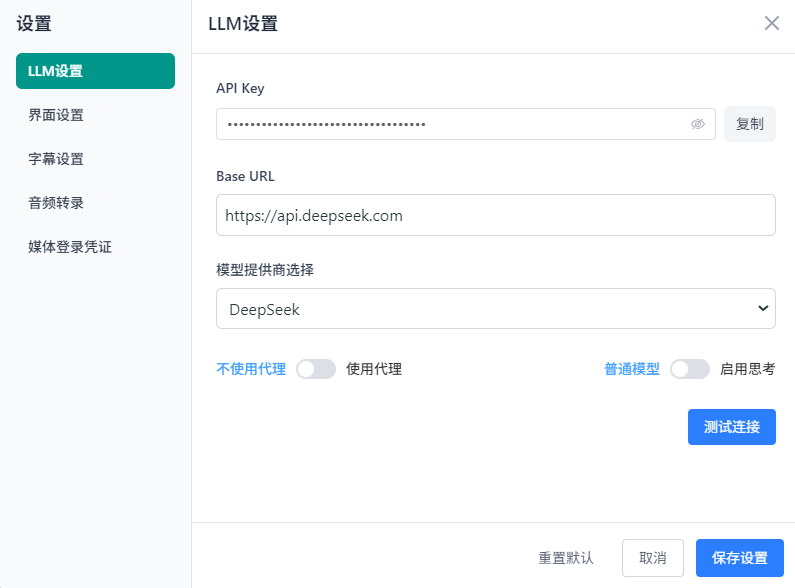
中文识别推荐使用 Medium 及以上版本,以确保识别质量。Large-v3的识别效果最佳.
[Python] 纯文本查看 复制代码
class TranscriptionEngineFactory:
"""工厂类:负责创建和管理不同类型的转录引擎实例"""
  # 引擎注册表:将字符串标识符映射到具体的引擎类
  # 这是工厂模式的核心 - 通过配置而非硬编码来决定使用哪个引擎
  _engines = {
      'faster_whisper': FasterWhisperEngine,    # 本地Whisper模型,CUDA加速
      'elevenlabs': ElevenLabsEngine,           # ElevenLabs云端API
      'alibaba': AlibabaEngine,                 # 阿里云DashScope服务
      'openai_whisper': OpenAIWhisperEngine,    # OpenAI官方API
      'remote_vidgo': RemoteVidGoEngine,        # 远程VidGo服务集群
  }

  @classmethod
  def create_engine(cls, engine_type: str, config: Dict[str, Any]) -> TranscriptionEngine:
      """
      工厂方法:根据类型字符串创建对应的引擎实例

      Args:
          engine_type: 引擎类型标识符 (如 'faster_whisper', 'openai_whisper')
          config: 包含API密钥、模型路径等配置的字典

      Returns:
          TranscriptionEngine: 具体的转录引擎实例

      Raises:
          ValueError: 当请求的引擎类型不存在时抛出
      """
      # 输入验证:检查请求的引擎类型是否在支持列表中
      if engine_type not in cls._engines:
          available_engines = ', '.join(cls._engines.keys())
          raise ValueError(f"Unknown engine type '{engine_type}'. Available: {available_engines}")

      # 动态实例化:通过反射机制创建具体引擎类的实例
      engine_class = cls._engines[zxsq-anti-bbcode-engine_type]
      return engine_class(config)

  @classmethod
  def get_available_engines(cls, config: Dict[str, Any]) -> list:
      """
      运行时检测:返回当前环境下可用且配置正确的引擎列表

      这个方法会实际尝试创建每个引擎实例,并调用其is_available()方法
      来验证必要的依赖(如API密钥、模型文件、网络连接)是否就绪

      Args:
          config: 系统配置字典,包含各引擎所需的认证信息

      Returns:
          list: 可用引擎的字符串标识符列表
      """
      available = []

      # 遍历所有注册的引擎类型
      for engine_type in cls._engines:
          try:
              # 尝试创建引擎实例并检查其可用性
              engine = cls.create_engine(engine_type, config)
              if engine.is_available():  # 各引擎自定义的可用性检查
                  available.append(engine_type)
          except Exception:
              # 静默忽略创建失败的引擎(可能是依赖缺失或配置错误)
              continue
      return available
def transcribe_with_engine(
engine_type: str,
audio_file_path: str,
progress_cb: Callable[[zxsq-anti-bbcode-str], None],
fallback_engine: Optional[zxsq-anti-bbcode-str] = None,
language: Optional[zxsq-anti-bbcode-str] = None
) -> str:
"""
容错转录函数:使用指定引擎进行音频转录,支持自动降级
  实现了两级容错机制:
  1. 主引擎失败时自动切换到备用引擎
  2. 在创建引擎实例前验证其可用性

  Args:
      engine_type: 首选引擎类型
      audio_file_path: 待转录的音频文件路径
      progress_cb: 进度回调函数,用于实时更新转录状态
      fallback_engine: 备用引擎类型,主引擎失败时使用
      language: 音频语言代码 (如 'zh', 'en'),None表示自动检测

  Returns:
      str: SRT格式的字幕内容

  Raises:
      Exception: 当所有引擎都失败时抛出
  """
  # 从配置文件加载转录相关设置(API密钥、模型路径等)
  config = load_transcription_settings()

  try:
      # === 第一级容错:主引擎处理 ===
      # 创建并验证主引擎实例
      engine = TranscriptionEngineFactory.create_engine(engine_type, config)
      if not engine.is_available():
          raise Exception(f"Engine '{engine_type}' is not available")

      # 执行转录任务,progress_cb用于实时反馈进度
      return engine.transcribe_audio(audio_file_path, progress_cb, language)

  except Exception as primary_error:
      # 记录主引擎失败原因,便于调试
      print(f"Primary engine '{engine_type}' failed: {primary_error}")

      # === 第二级容错:备用引擎处理 ===
      if fallback_engine:
          try:
              # 尝试创建并使用备用引擎
              fallback = TranscriptionEngineFactory.create_engine(fallback_engine, config)
              if fallback.is_available():
                  print(f"Falling back to engine: {fallback.engine_name}")
                  return fallback.transcribe_audio(audio_file_path, progress_cb, language)
          except Exception as fallback_error:
              # 记录备用引擎失败原因
              print(f"Fallback engine '{fallback_engine}' also failed: {fallback_error}")

      # 所有引擎都失败时,抛出聚合错误
      raise Exception(f"All transcription engines failed")
def transcribe_with_engine(
engine_type: str,
audio_file_path: str,
progress_cb: Callable[[str], None],
fallback_engine: Optional[str] = None,
language: Optional[str] = None
) -> str:
"""
容错转录函数:使用指定引擎进行音频转录,支持自动降级
  实现了两级容错机制:
  1. 主引擎失败时自动切换到备用引擎
  2. 在创建引擎实例前验证其可用性

  Args:
      engine_type: 首选引擎类型
      audio_file_path: 待转录的音频文件路径
      progress_cb: 进度回调函数,用于实时更新转录状态
      fallback_engine: 备用引擎类型,主引擎失败时使用
      language: 音频语言代码 (如 'zh', 'en'),None表示自动检测

  Returns:
      str: SRT格式的字幕内容

  Raises:
      Exception: 当所有引擎都失败时抛出
  """
  # 从配置文件加载转录相关设置(API密钥、模型路径等)
  config = load_transcription_settings()

  try:
      # === 第一级容错:主引擎处理 ===
      # 创建并验证主引擎实例
      engine = TranscriptionEngineFactory.create_engine(engine_type, config)
      if not engine.is_available():
          raise Exception(f"Engine '{engine_type}' is not available")

      # 执行转录任务,progress_cb用于实时反馈进度
      return engine.transcribe_audio(audio_file_path, progress_cb, language)

  except Exception as primary_error:
      # 记录主引擎失败原因,便于调试
      print(f"Primary engine '{engine_type}' failed: {primary_error}")

      # === 第二级容错:备用引擎处理 ===
      if fallback_engine:
          try:
              # 尝试创建并使用备用引擎
              fallback = TranscriptionEngineFactory.create_engine(fallback_engine, config)
              if fallback.is_available():
                  print(f"Falling back to engine: {fallback.engine_name}")
                  return fallback.transcribe_audio(audio_file_path, progress_cb, language)
          except Exception as fallback_error:
              # 记录备用引擎失败原因
              print(f"Fallback engine '{fallback_engine}' also failed: {fallback_error}")

      # 所有引擎都失败时,抛出聚合错误
      raise Exception(f"All transcription engines failed")
[b]2. 实现流媒体(例如16G大小的4K电影)在网页端的流畅播放:
[Python] 纯文本查看 复制代码
  def serve_video(self, request, filename):
"""
视频流媒体服务方法:支持HTTP Range请求的高性能视频播放
  核心功能:
  1. 支持视频拖拽(HTTP Range请求)
  2. 内存友好的分块流式传输
  3. 自动编解码器检测
  4. URL时间参数支持(?t=90跳转到90秒)
  5. CORS跨域支持
  """

  # === 文件路径构建和存在性验证 ===
  file_path = os.path.join(settings.MEDIA_ROOT, "saved_video", filename)

  if not os.path.exists(file_path):
      from django.http import Http404
      raise Http404("File not found")

  # === 文件元信息获取 ===
  # 获取文件大小,用于Content-Length头和Range计算
  file_size = os.path.getsize(file_path)
  # 通过FFprobe检测视频编解码器,返回正确的MIME类型
  content_type = detect_video_codec(file_path)

  # === URL时间参数解析 ===
  # 支持 ?t=90 或 ?t=90.5 格式,用于视频初始定位
  time_param = request.GET.get('t')
  initial_seek_time = None
  if time_param:
      try:
          # 解析时间参数(支持秒数或浮点数)
          if time_param.isdigit():
              initial_seek_time = int(time_param)
          else:
              # 后续可扩展支持 1m30s 格式
              initial_seek_time = int(float(time_param))
          print(f"[zxsq-anti-bbcode-MediaActionView] Initial seek time from query param: {initial_seek_time}s")
      except (ValueError, TypeError):
          print(f"[zxsq-anti-bbcode-MediaActionView] Invalid time parameter: {time_param}")
          initial_seek_time = None

  # === 内存管理配置 ===
  CHUNK_SIZE = 8192 * 8  # 64KB块大小 - 平衡内存使用和I/O效率
  MAX_RANGE_SIZE = 100 * 1024 * 1024  # 单次Range请求最大100MB,防止内存溢出

  # === 调试信息输出 ===
  print(f"[zxsq-anti-bbcode-MediaActionView] Serving video: {filename}")
  print(f"[zxsq-anti-bbcode-MediaActionView] Detected content type: {content_type}")
  print(f"[zxsq-anti-bbcode-MediaActionView] File size: {file_size} bytes")

  # === HTTP Range请求处理 ===
  # Range请求是现代视频播放器拖拽功能的核心
  range_header = request.headers.get('Range', None)
  if range_header:
      import re

      # === Range头解析 ===
      # 解析 "bytes=start-end" 格式的Range头
      match = re.search(r'bytes=(\d+)-(\d*)', range_header)
      if not match:
          # Range头格式错误,返回416状态码
          response = HttpResponse(status=416)
          response['Content-Range'] = f'bytes */{file_size}'
          return response

      first_byte, last_byte = match.groups()
      first_byte = int(first_byte)
      # 如果end为空,默认到文件末尾
      last_byte = int(last_byte) if last_byte else file_size - 1

      # === Range边界检查 ===
      if last_byte >= file_size:
          last_byte = file_size - 1

      if first_byte > last_byte or first_byte < 0:
          # 无效的Range范围
          response = HttpResponse(status=416)
          response['Content-Range'] = f'bytes */{file_size}'
          return response

      length = last_byte - first_byte + 1

      # === 内存保护:限制单次Range大小 ===
      # 防止恶意请求消耗过多内存
      if length > MAX_RANGE_SIZE:
          last_byte = first_byte + MAX_RANGE_SIZE - 1
          length = MAX_RANGE_SIZE

      # === 分块文件读取生成器 ===
      def file_iterator():
          """
          内存友好的文件读取生成器
          只在需要时读取数据,避免大文件一次性加载到内存
          """
          with open(file_path, 'rb') as f:
              f.seek(first_byte)  # 定位到Range起始位置
              remaining = length
              while remaining > 0:
                  # 计算本次读取的块大小
                  chunk_size = min(CHUNK_SIZE, remaining)
                  chunk = f.read(chunk_size)
                  if not chunk:
                      break  # 文件结束
                  remaining -= len(chunk)
                  yield chunk  # 流式返回数据块

      # === 206 Partial Content响应构建 ===
      response = StreamingHttpResponse(
          file_iterator(),
          status=206,  # HTTP 206 Partial Content
          content_type=content_type
      )
      # Range响应的必需头部
      response['Content-Range'] = f'bytes {first_byte}-{last_byte}/{file_size}'
      response['Content-Length'] = str(length)
      response['Accept-Ranges'] = 'bytes'

      # === CORS跨域支持 ===
      response['Access-Control-Allow-Origin'] = '*'
      response['Access-Control-Allow-Headers'] = 'Range'
      response['Access-Control-Expose-Headers'] = 'Content-Range, Content-Length, Accept-Ranges, X-Initial-Time'

      # === 初始播放时间头部 ===
      # 前端可通过X-Initial-Time头获取URL中的时间参数
      if initial_seek_time is not None:
          response['X-Initial-Time'] = str(initial_seek_time)

      return response
  else:
      # === 完整文件响应(非Range请求) ===
      def file_iterator():
          """
          完整文件的分块读取生成器
          即使是完整文件也使用流式传输,避免大视频文件内存问题
          """
          with open(file_path, 'rb') as f:
              while True:
                  chunk = f.read(CHUNK_SIZE)
                  if not chunk:
                      break  # 文件读取完毕
                  yield chunk

      # === 200 OK完整响应构建 ===
      response = StreamingHttpResponse(
          file_iterator(),
          content_type=content_type
      )
      response['Content-Length'] = str(file_size)
      response['Accept-Ranges'] = 'bytes'  # 告知客户端支持Range请求

      # === CORS跨域支持 ===
      response['Access-Control-Allow-Origin'] = '*'
      response['Access-Control-Allow-Headers'] = 'Range'
      response['Access-Control-Expose-Headers'] = 'Content-Range, Content-Length, Accept-Ranges, X-Initial-Time'

      # === 初始播放时间头部 ===
      if initial_seek_time is not None:
          response['X-Initial-Time'] = str(initial_seek_time)

      return response

 [复制链接]
 发表于 2025-9-20 23:37
 发表于 2025-9-21 01:25
 |
发表于 2025-9-21 10:52
|
发表于 2025-9-21 10:52