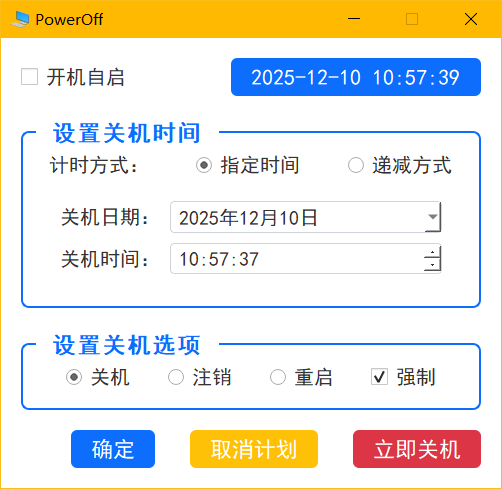
[Python] 纯文本查看 复制代码
import sys
import os
from PyQt5.QtWidgets import (QApplication, QWidget, QCheckBox, QLabel, QGroupBox,
QRadioButton, QDateEdit, QTimeEdit, QPushButton,
QVBoxLayout, QHBoxLayout, QGridLayout, QStyle,
QSpacerItem, QSizePolicy, QMessageBox, QStackedWidget,
QSpinBox)
from PyQt5.QtCore import QDate, QTime, QTimer, QDateTime, Qt
from PyQt5.QtGui import QIcon, QFont

class PowerOffWidget(QWidget):
    def __init__(self):
        super().__init__()
        self.initUI()

    def initUI(self):
        self.setWindowTitle("PowerOff")
        self.setWindowIcon(self.style().standardIcon(QStyle.SP_ComputerIcon))
        self.setFixedSize(500, 450)
        self.setFont(QFont("SimHei", 12))

        self.setStyleSheet("""
            QWidget {
                background-color: #ffffff;
                color: #333;
            }

            QGroupBox {
                font-size: 14pt;
                font-weight: bold;
                color: #0d6efd;
                border: 2px solid #0d6efd;
                border-radius: 8px;
                margin-top: 15px;
                padding: 10px 15px;
                background: white;
            }
            QGroupBox::title {
                left: 15px;
                top: -10px;
                background: white;
                padding: 0 10px;
            }

            QLabel#currentTimeLabel {
                background: #0d6efd;
                color: white;
                padding: 8px 15px;
                border-radius: 6px;
                font-size: 13pt;
                min-width: 200px;
                text-align: center;
            }

            QPushButton {
                padding: 8px 20px;
                border-radius: 6px;
                font-size: 13pt;
                color: white;
                background: #0d6efd;
                border: none;
            }
            QPushButton:hover {
                background: #0b5ed7;
            }
            QPushButton#shutdownNowBtn {
                background: #dc3545;
            }
            QPushButton#shutdownNowBtn:hover {
                background: #bb2d3b;
            }
        QPushButton#cancelBtn {
            background: #ffc107;
        }
        QPushButton#cancelBtn:hover {
            background: #e0a800;
        }
            QDateEdit, QTimeEdit, QSpinBox {
                padding: 6px;
                border: 1px solid #ced4da;
                border-radius: 4px;
                width: 300px;
            }
            QCheckBox, QRadioButton {
                spacing: 8px;
                font-size: 12pt;
            }
        """)

        mainLayout = QVBoxLayout(self)
        mainLayout.setContentsMargins(20, 20, 20, 20)
        mainLayout.setSpacing(20)

        topLayout = QHBoxLayout()
        autoRunChk = QCheckBox("开机自启")
        self.timeLabel = QLabel()
        self.timeLabel.setObjectName("currentTimeLabel")

        topLayout.addWidget(autoRunChk)
        topLayout.addSpacerItem(QSpacerItem(5, 5, QSizePolicy.Expanding, QSizePolicy.Minimum))
        topLayout.addWidget(self.timeLabel)
        mainLayout.addLayout(topLayout)

        timeGroup = QGroupBox("设置关机时间")
        timeLayout = QVBoxLayout()
        timeLayout.setSpacing(15)

        methodLayout = QHBoxLayout()
        methodLayout.addWidget(QLabel("计时方式:"))
        methodLayout.addStretch()
        self.specRadio = QRadioButton("指定时间")
        self.specRadio.setChecked(True)
        methodLayout.addWidget(self.specRadio)
        methodLayout.addStretch()
        self.countRadio = QRadioButton("递减方式")
        methodLayout.addWidget(self.countRadio)
        timeLayout.addLayout(methodLayout)

        self.stackedWidget = QStackedWidget()

        specTimeWidget = QWidget()
        dtGrid = QGridLayout(specTimeWidget)
        dtGrid.setSpacing(10)
        dtGrid.setAlignment(Qt.AlignLeft)
        dtGrid.addWidget(QLabel("关机日期:"), 0, 0, Qt.AlignRight)
        self.dateEdit = QDateEdit(QDate.currentDate())
        self.dateEdit.setDisplayFormat("yyyy年M月d日")
        self.dateEdit.setCalendarPopup(True)
        dtGrid.addWidget(self.dateEdit, 0, 1)
        dtGrid.addWidget(QLabel("关机时间:"), 1, 0, Qt.AlignRight)
        self.timeEdit = QTimeEdit(QTime.currentTime())
        self.timeEdit.setDisplayFormat("h:mm:ss")
        dtGrid.addWidget(self.timeEdit, 1, 1)

        countDownWidget = QWidget()
        countLayout = QHBoxLayout(countDownWidget)
        countLayout.setAlignment(Qt.AlignLeft)
        self.hourSpin = QSpinBox()
        self.hourSpin.setRange(0, 99)
        self.minSpin = QSpinBox()
        self.minSpin.setRange(0, 59)
        self.secSpin = QSpinBox()
        self.secSpin.setRange(0, 59)
        countLayout.addWidget(self.hourSpin)
        countLayout.addWidget(QLabel("小时"))
        countLayout.addSpacing(15)
        countLayout.addWidget(self.minSpin)
        countLayout.addWidget(QLabel("分钟"))
        countLayout.addSpacing(15)
        countLayout.addWidget(self.secSpin)
        countLayout.addWidget(QLabel("秒"))

        self.stackedWidget.addWidget(specTimeWidget)
        self.stackedWidget.addWidget(countDownWidget)
        timeLayout.addWidget(self.stackedWidget)

        timeGroup.setLayout(timeLayout)
        mainLayout.addWidget(timeGroup)

        optGroup = QGroupBox("设置关机选项")
        optLayout = QHBoxLayout()
        optLayout.setSpacing(20)
        self.shutRadio = QRadioButton("关机")
        self.shutRadio.setChecked(True)
        self.logRadio = QRadioButton("注销")
        self.rebootRadio = QRadioButton("重启")
        self.forceChk = QCheckBox("强制")
        self.forceChk.setChecked(True)
        optLayout.addStretch()
        optLayout.addWidget(self.shutRadio)
        optLayout.addStretch()
        optLayout.addWidget(self.logRadio)
        optLayout.addStretch()
        optLayout.addWidget(self.rebootRadio)
        optLayout.addStretch()
        optLayout.addWidget(self.forceChk)
        optLayout.addStretch()
        optGroup.setLayout(optLayout)
        mainLayout.addWidget(optGroup)

        btnLayout = QHBoxLayout()
        btnLayout.addStretch()
        self.okBtn = QPushButton("确定")
        self.cancelBtn = QPushButton("取消计划")
        self.cancelBtn.setObjectName("cancelBtn")
        self.nowBtn = QPushButton("立即关机")
        self.nowBtn.setObjectName("shutdownNowBtn")
        btnLayout.addWidget(self.okBtn)
        btnLayout.addSpacing(15)
        btnLayout.addWidget(self.cancelBtn)
        btnLayout.addSpacing(15)
        btnLayout.addWidget(self.nowBtn)
        mainLayout.addLayout(btnLayout)

        self.okBtn.clicked.connect(self.handle_ok)
        self.cancelBtn.clicked.connect(self.cancel_shutdown)
        self.nowBtn.clicked.connect(self.handle_shutdown_now)
        self.specRadio.toggled.connect(self.update_input_mode)

        self.timer = QTimer()
        self.timer.timeout.connect(self.updateTime)
        self.timer.start(1000)
        self.updateTime()
        self.update_input_mode()

    def update_input_mode(self):
        if self.specRadio.isChecked():
            self.stackedWidget.setCurrentIndex(0)
        else:
            self.stackedWidget.setCurrentIndex(1)

    def handle_ok(self):
        seconds = 0
        action_name, msg = "", ""

        if self.specRadio.isChecked():
            target_dt = QDateTime(self.dateEdit.date(), self.timeEdit.time())
            seconds = QDateTime.currentDateTime().secsTo(target_dt)
            if seconds <= 0:
                QMessageBox.warning(self, "错误", "指定时间必须晚于当前时间!")
                return
            action_name = self.get_action_name()
            msg = f"已设定计划任务:\n\n将在 {target_dt.toString('yyyy-MM-dd HH:mm:ss')} 执行 {action_name} 操作。"
        else:
            hours = self.hourSpin.value()
            minutes = self.minSpin.value()
            secs = self.secSpin.value()
            seconds = hours * 3600 + minutes * 60 + secs
            if seconds <= 0:
                QMessageBox.warning(self, "错误", "倒计时必须大于0秒!")
                return
            action_name = self.get_action_name()
            msg = f"已设定计划任务:\n\n将在 {hours} 小时 {minutes} 分钟 {secs} 秒后执行 {action_name} 操作。"

        self.execute_shutdown_command(seconds, msg)

    def handle_shutdown_now(self):
        action_name = self.get_action_name()
        reply = QMessageBox.question(self, "确认操作", f"您确定要立即{action_name}吗?",
                                     QMessageBox.Yes | QMessageBox.No, QMessageBox.No)
        if reply == QMessageBox.Yes:
            msg = f"系统将立即执行 {action_name} 操作。"
            self.execute_shutdown_command(1, msg)

    def cancel_shutdown(self):
        os.system("shutdown -a")
        QMessageBox.information(self, "操作成功", "所有已计划的关机任务已被取消。")

    def execute_shutdown_command(self, seconds, msg):
        if self.shutRadio.isChecked():
            action_flag = "-s"
        elif self.rebootRadio.isChecked():
            action_flag = "-r"
        else:
            action_flag = "-l"

        force_flag = "-f" if self.forceChk.isChecked() else ""

        command = f"shutdown {action_flag} {force_flag} -t {seconds}"
        os.system(command)
        QMessageBox.information(self, "计划任务已设定", msg)

    def get_action_name(self):
        if self.shutRadio.isChecked():
            return "关机"
        elif self.rebootRadio.isChecked():
            return "重启"
        else:
            return "注销"

    def updateTime(self):
        self.timeLabel.setText(QDateTime.currentDateTime().toString("yyyy-MM-dd HH:mm:ss"))

if __name__ == '__main__':
    app = QApplication(sys.argv)
    app.setStyle("Fusion")
    win = PowerOffWidget()
    win.show()
    sys.exit(app.exec_())

 [复制链接]
 发表于 2025-12-10 10:59
 |
发表于 2025-12-10 11:51
|
发表于 2025-12-10 11:51