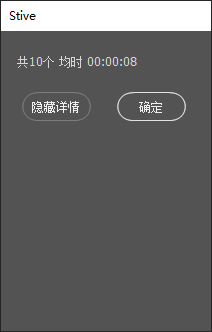
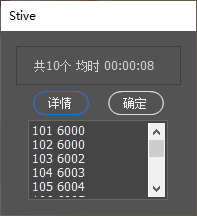
[JavaScript] 纯文本查看 复制代码 function ShowMessageBox(value) {
// 分割字符串,处理无?分隔符的情况,避免索引未定义
var valueArr = value ? value.split('?') : ['', ''];
var titleText = valueArr[0] || '无提示信息';
var detailText = valueArr[1] || '无详细内容';
// 定义对话框固定尺寸常量(宽, 高),满足你的需求
var DIALOG_SIZE_INIT = [200, 300]; // 初始尺寸
var DIALOG_SIZE_DETAIL = [200, 600]; // 显示详情后的尺寸
var CONTENT_WIDTH = 180; // 面板/文本框宽度(小于对话框宽度,预留边距,避免过宽)
// 创建对话框,设置初始固定尺寸
var dialog = new Window('dialog', "Stive");
dialog.preferredSize.width = DIALOG_SIZE_INIT[0];
dialog.preferredSize.height = DIALOG_SIZE_INIT[1];
dialog.alignChildren = 'fill';
dialog.spacing = 10;
// 添加提示文本,适配对话框宽度,避免挤压
var tipText = dialog.add('statictext', undefined, titleText);
tipText.preferredSize.width = CONTENT_WIDTH;
tipText.preferredSize.height = 30;
// 声明详情面板变量(初始不创建,避免占位)
var panel = null;
var textDisplay = null;
// 创建按钮组,优化布局,避免按钮重叠
var buttonGroup = dialog.add("group");
buttonGroup.alignChildren = 'right';
buttonGroup.spacing = 15;
buttonGroup.preferredSize.height = 40;
buttonGroup.preferredSize.width = CONTENT_WIDTH;
// 添加按钮,设置固定尺寸
var AButton = buttonGroup.add("button", [0, 0, 80, 30], "详情");
var confirmButton = buttonGroup.add("button", [0, 0, 80, 30], "确定");
dialog.defaultElement = confirmButton;
// 详情按钮点击事件:动态添加/移除面板,切换对话框尺寸
AButton.onClick = function() {
if (!panel) {
// 第一步:创建详情面板(首次点击显示时创建,避免初始占位)
panel = dialog.add('panel');
panel.borderless = true;
panel.orientation = 'column';
panel.alignChildren = 'left';
panel.spacing = 5;
panel.preferredSize.width = CONTENT_WIDTH;
panel.preferredSize.height = DIALOG_SIZE_DETAIL[1] - 100; // 适配详情对话框高度,预留按钮/提示区域
// 第二步:创建禁止复制、可滚动、只读的文本框
textDisplay = panel.add('edittext', [0, 0, CONTENT_WIDTH, panel.preferredSize.height - 10], detailText, {
multiline: true,
scrollable: true,
readonly: true,
borderless: true
});
// 核心:拦截onCopy事件,返回false禁止复制文本
textDisplay.onCopy = function() {
return false;
};
// 第三步:切换对话框到详情固定尺寸
dialog.preferredSize.width = DIALOG_SIZE_DETAIL[0];
dialog.preferredSize.height = DIALOG_SIZE_DETAIL[1];
// 按钮文本切换(可选,提升用户体验)
AButton.text = "隐藏详情";
} else {
// 第一步:删除面板,彻底移除占位
dialog.remove(panel);
panel = null;
textDisplay = null;
// 第二步:恢复对话框初始固定尺寸
dialog.preferredSize.width = DIALOG_SIZE_INIT[0];
dialog.preferredSize.height = DIALOG_SIZE_INIT[1];
// 按钮文本切换(可选,提升用户体验)
AButton.text = "详情";
}
};
// 确定按钮点击事件:关闭对话框
confirmButton.onClick = function() {
dialog.close();
};
// 显示对话框
dialog.show();
}
var text = "共10个 均时 00:00:08?101 6000\n102 6000\n103 6002\n104 6003\n105 6004\n106 6005\n107 6006\n108 6007\n109 6008\n110 6009\n111 6010\n112 6011\n113 6012\n114 601\n115 6014\n116 6015\n117 6016\n118 6017\n119 6018\n120 6019\n121 6020\n122 6021\n123 6022\n124 6023\n125 6024\n126 6025\n127 6026\n128 6027\n129 6028\n130 6029\n131 6030\n132 6031\n";
// 调用函数
ShowMessageBox(text); | 
 发表于 2025-12-28 22:16
 |
发表于 2025-12-29 09:18
|
发表于 2025-12-29 09:18